
Cloud Stats

The Cloud Stats project is my attempt at building a very simple web page and event tracker that runs inside a Cloudflare worker and D1 database. I wanted to be able to replace more complex solutions like Google Analytics and have a self hosted and customizable solution.
Architecture
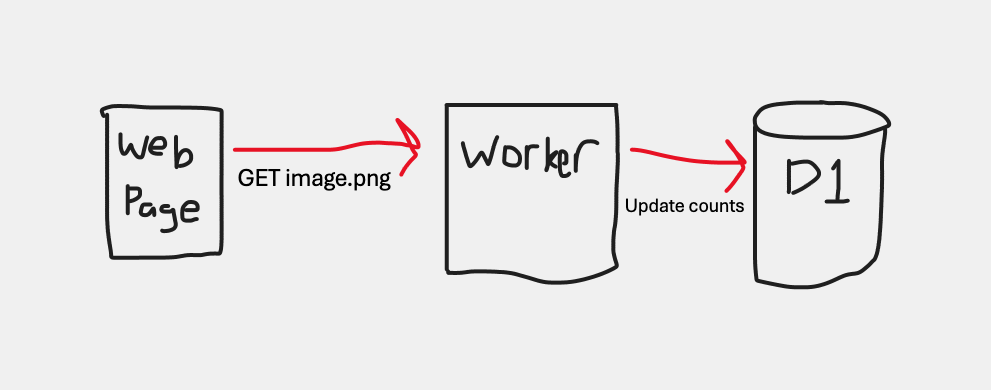
The architecture has been kept simple and maintainable on purpose for easy to manage in the future. The main part of this project is the Cloudflare Worker that connects the clients to the database.
Cloudflare Worker
Tech Stack
API Design
GET /assets/site/:actionName/image.png
This endpoint returns a transparent image and at the same time it updates the statistics table in the database. The image has a cache control setting of 60 seconds to ensure that the browser does not load the image again if the user refreshes or navigates to this same page within a short time frame.
GET /assets/site/image.png
This endpoint is the same as the previous image endpoint except without an action name in the URL. This endpoint is specifically used for tracking a generic visit to the domain, so that the statistics can best estimate the number of unique visits to the domain. The cache control is set to 10 minutes for this image.
POST /events
This endpoint is a POST endpoint to create a new statistic via an API call. This endpoint requires a secret api key in the header to ensure only authorized callers can use the API.
GET /statistics
This endpoint currently returns all statistics from the current domain. This is a debug endpoint only and my intention is to create a simple dashboard endpoint that will return a very basic HTML site that gives a summary of the current statistics.
Data structure
I attempted to keep the data structure as simple as possible while also considering that Cloudflare D1 pricing is charged based on reads and writes. In order to reduce costs, I decided to have only one table rather than a clean relational database structure.
I wanted the one table to be flexible enough that it supports page views, events, and perhaps other types of statistics in the future. The table has a type column and then based on the type the actionName and actionValue columns are used to identify the actual statistics (eg. actionName = article and actionValue = https://www.domain.com/page).
The table is called statisticsand makes use of the JSON string type.
| Field | Description |
|---|---|
| id | Auto generated UUID |
| siteId | Site Identifier that this statistic belongs too |
| type | Type of statistics (visit, event) |
| actionName | Name of the action (eg. page_view, download) |
| actionValue | Value of the action (eg. page url, file url) |
| overallCounts | JSON object containing count statistics |
| countryCounts | JSON object containing count statistics |
| refererCounts | JSON object containing count statistics |
| createdAt | Created date |
| updatedAt | Updated date |
The JSON columns for the counts contain multiple places that need to increment the counts on each increment. In order to make the updates atomic, I needed to find a way to avoid doing a database read to get the current values and then do a write with the updated values. Luckily the database supports the json_set command which allows a single database call to update the counts in one action.
The following code snippet below is an example of how the total count is updated in one action. The datatbase first attempts to insert the clean insertJson value with counts of 1. But if the entry already exists, it then attempts to update the current value by using the json_set command to get the current count and increment it by 1.
const overallCountsYearPath = `$.years.${year}.months.${month}`;
const insertJson = {
  total: 1,
  years: {
    [year]: {
      months: {
        [month]: 1,
      },
    },
  },
};

await db
  .insert(schema.statistics)
  .values({
    id: crypto.randomUUID(),
    siteId,
    type,
    actionName,
    actionValue,
    overallCounts: insertJson,
    createdAt: Date.now(),
    updatedAt: Date.now(),
  })
  .onConflictDoUpdate({
    target: [
      schema.statistics.siteId,
      schema.statistics.type,
      schema.statistics.actionName,
      schema.statistics.actionValue,
    ],
    set: {
      overallCounts: sql`
					json_set(
						${schema.statistics.overallCounts},
						'$.total',
						COALESCE(json_extract(${schema.statistics.overallCounts}, '$.total'), 0) + 1,
						${overallCountsYearPath},
						COALESCE(json_extract(${schema.statistics.overallCounts}, ${overallCountsYearPath}), 0) + 1
					)
				`,
      updatedAt: Date.now(),
    },
  });
Web Component
The Cloudflare worker project exposes a HTML web component that can be imported and used on any web page. The web component constructs a <img> URL path to correctly increase the statistics for that page.
The below HTML snippet is how to add the component and use it.
<html>
  <head>
    <script
      type="module"
      src="https://hits.mydomain.com/js/cloudstats.webcomponent.js"
    ></script>
  </head>
  <body>
    <cloud-stats action="page_load"></cloud-stats>
  </body>
</html>
Setting Up a Site
In Cloudflare development platform, add a custom domain to the worker so that it runs on the same domain as the site that will be tracked. For example if the site that you want to track is https://www.domain.com then setup the worker to run on a domain like https://stats.domain.com.
Update the SITE_IDS environment variables of the worker to add the new domain to the list.
Update the web site project to add the web component and usage of the action attribute for the use case of that tracking page. If you do not include the action attribute it will track a generic domain visit.
Next steps
For the web sites that I am switching to use this project, I want to export some of the core statistics and then import into this project.
Next I would add a simple dashboard page to see overall statistics, and then I want to add a visible image tracking page that will return an image with the current statistics for that actionName and actionValue like the 90s hit counters.