
Portuguese AI - SVG Builder


In the next phase of this project, my goal was to build a map of the learning path that could be edited and maintained in the project's Cloudflare D1 database. I looked in to various libraries available online for building node based diagrams, for example React Flow, but I couldn't find one that was simple enough to build what I wanted. I didn't want to use React, instead I am using HTMX with a very light backend to supply the HTML markup.
I looked into what I really wanted, and in the end I just needed a very basic SVG builder, so I built it.
Requirements
The SVG builder needed the following features.
- A preset list of available node types (Units, lessons, etc) and a simple connector to join the nodes (lines).
- The editor should be drag and drop based.
- The nodes and lines should all fall on a grid system, so that everything lines up easily.
- A save button will send the array of nodes to the backend for persisting to the database.
Libraries
Lucikly SVGs are just another form of markup like HTML, and they already have elements like Rect and Line which covers every use case I needed. So the editor will just be adding these elements to an SVG and setting their properties.
As I am not using any client side library like React, I will need to have a simple way that I can have an array of nodes and reflect that automatically in an SVG. In the end I chose to use Alpine.js, which is a light library that runs on the client side and provides very basic state management and automatic updating.
With Alpine.js I could keep an array of nodes and create a template that can render the SVG, by looping the nodes and drawing the elements to the SVG. When any node's properties are changed the front end code is automatically updated to change the SVG.
Example code
In the following example I have the nodes array, and the Alpine.js template that can render the node to the SVG.
Nodes array:
nodes: [
  { type: 'title', x: 20, y: 20, width: 120, height: 40, color: 'white', stroke: 'white', message: 'Title' },
  { type: 'unit', x: 20, y: 80, width: 120, height: 40, color: 'lightblue', stroke: 'black', message: 'Unit' },
  { type: 'lesson', x: 20, y: 140, width: 120, height: 40, color: 'lightgreen', stroke: 'black', message: 'Lesson' },
  { type: 'line-horizontal', x: 20, y: 200, width: 120, height: 40, color: 'yellow', stroke: 'black', message: 'Line-X' },
],
Sample rendering component:
const SvgEditorNodesTitle: FC = () => {
  return (
    <g
      {...{
        "x-show": "node.type==='title'",
        ":transform": "`translate(${node.x}, ${node.y})`",
        "@mousedown": "startDrag(index, $event, false, 'move')",
      }}
      class="hover:cursor-pointer"
    >
      <rect
        {...{
          ":width": "node.width",
          ":height": "node.height",
          ":fill": "node.color",
          ":stroke": "node.stroke",
        }}
        rx="8"
        ry="8"
        stroke-width="3"
      />
      <text
        {...{
          ":x": "node.width / 2",
          ":y": "node.height / 2",
          "x-text": "node.message",
        }}
        text-anchor="middle"
        dominant-baseline="middle"
        style="user-select: none"
      />
    </g>
  );
};
Sample logic to bind the nodes data to the SVG using Alpine.js. This means that any time the nodes array is manipulated, the SVG data is automatically kept in sync and the SVG elements are changed.
<div {...{ "x-data": "svgEditor()" }} class="flex flex-row">
  <svg
    width="1200"
    height="1011"
    {...{
      "@mousemove": "dragging && dragNode($event)",
      "@mouseup": "endDrag($event)",
      "@mouseleave": "endDrag($event)",
    }}
  >
    <g transform="translate(200 20)">
      <rect x="0" y="0" width="961" height="961" fill="url(#grid)" />
      <template {...{ "x-for": "(node, index) in nodes", ":key": "index" }}>
        <g>
          <SvgEditorNodesTitle />
        </g>
      </template>
    </g>
  </svg>
</div>
In order to support Alpine.js atributes inside a JSX rendered component, the attributes need to be passed as an object and then using the spread operator to bring them back to the top level. Originally I was passing these attributes at the top level, but TypeScript gives errors as these attributes are not supported in JSX.
Editor
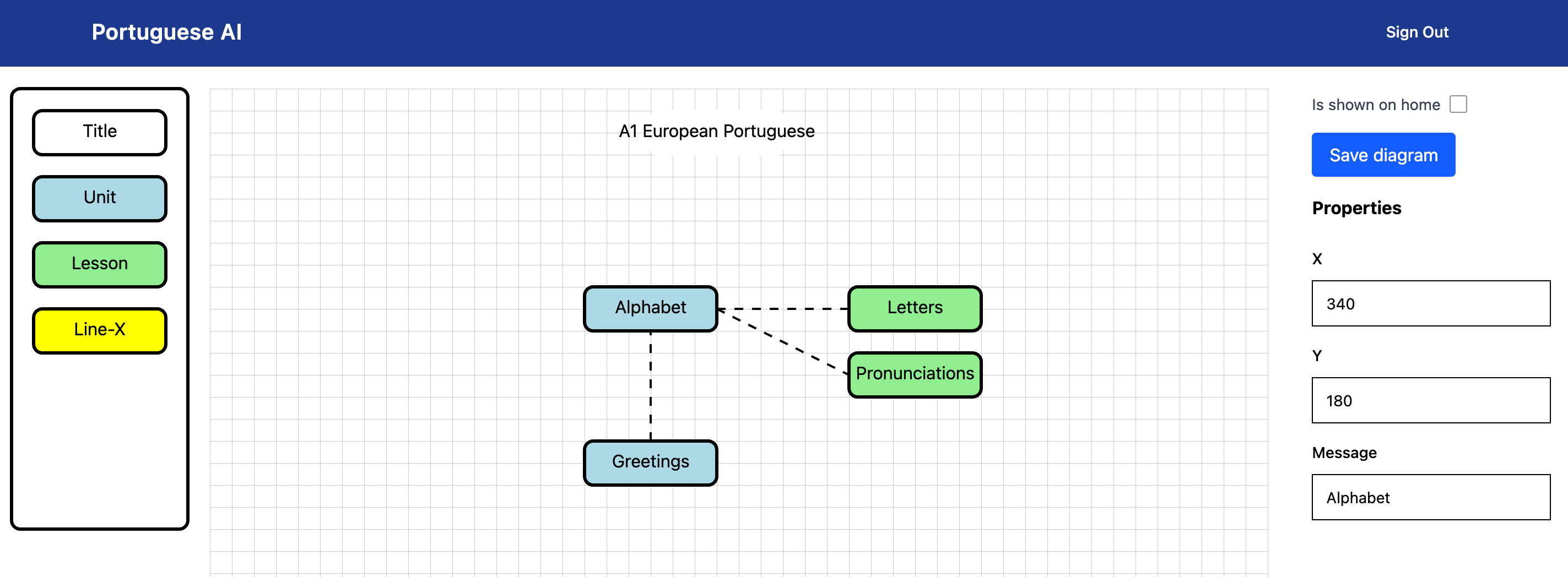
The editor component that was built allows dragging and dropping SVG elements onto a grid, and also allows setting of properties like the text inside the rect elements.
Viewer
I also build a simple viewer component that receives the nodes array from the database and is able to build the pure SVG and serve it to the client. The viewer component does not support any editing features like drag and drop, and so the generated SVG is simple and clean.
Next Steps
For the next steps of this project, I will be working on adding the ability to create and view the details pages that will open when clicking on a node. To start with it will support the following details on the page;
- Markdown content for teach the topic
- Free resource links (articles, videos, etc)
- Premium resources (paid for services / items like books)
- Previous: Portuguese AI - Better Auth
- Next: Portuguese AI - Lessons Modal